
Stop spam without frustrating your visitors

Create your CleanTalk account and start blocking spam — no CAPTCHA challenges and no impact on visitors.

Security Block Lists

CleanTalk Account

No credit card required • Setup takes less than a minute • Your temporary password will be sent by email.

Tag: security

  • Limiting the number of password attempts in the web login form using Nginx or HAProxy by way of example of WordPress

    By the example of WordPress consider a method for enhancing security by limiting the number of HTTP-requests to the form of entering the password. This helps protect against brute force published a blog (search and crack the password by trying all possible scenarios of a particular set of characters, or the selection of a dictionary of common passwords). This method, in principle, can be used to protect other Web applications.

    The task can be realized using Nginx module ngx_http_limit_req_module [1] acts as a front-end to the Apache Web server or FastCGI, or via HAProxy [2, 3], acts as a load balancer in front of web servers.

    In both cases, the algorithm works as follows. When authentication browser refer to the addresses containing the substring “/wp-login.php”. It is necessary to keep track of it and to limit the number of requests from the same IP without affecting circulation to all other addresses. Block settings must be chosen in such way as not to create a normal user inconvenience. Especially attentively should be configured to lock when the authorization form uses a large number of users with the same IP-address.

    Method №1: Nginx

    http {
    <...>
    
    limit_req_zone $binary_remote_addr zone=login:10m rate=15r/m;
    
    server {
    listen 80;
    server_name frontend.example.org;
    
    location ~* /wp-login.php {
    limit_req zone=login burst=4;
    proxy_pass http://backend:8080;
    <...>
    }
    
    location / {
    proxy_pass http://backend:8080;
    <...>
    }
    }

    Block settings:

    limit_req_zone $binary_remote_addr zone=login: 10m rate=15r/m; Sets an area of shared memory, which stores the state for different IP-addresses. In our case, the state is stored in the zone “login” size of 10 megabytes, and the average speed of query processing for the zone can not exceed 15 requests per minute. The processing speed can be specified in requests per second (r/s) or requests per minute (r/m).

    limit_req zone=login burst=4; sets the login area and the maximum size of the burst of requests. If the requests rate higher than described in the area, their processing is delayed so that the request is being processed at a given speed. Excessive requests are delayed as long as their number does not exceed the maximum size of the burst. When exceeding the request fails with the error 503.

    Method №2: HAProxy

    In this section of the backend, serving our blog, add the following lines [2]:

    tcp-request inspect-delay 10s
    tcp-request content accept if HTTP
    # brute force protection
    acl wp_login path_beg -i /wp-login.php
    stick-table type binary len 20 size 500 store http_req_rate(20s) peers local
    tcp-request content track-sc2 base32+src if METH_POST wp_login
    stick store-request base32+src if METH_POST wp_login
    acl bruteforce_detection sc2_http_req_rate gt 5
    acl flag_bruteforce sc1_inc_gpc0 gt 0
    http-request deny if bruteforce_detection flag_bruteforce
    

    Upon detection of POST-request to the page /wp-login.php saved hash of three elements: header HTTP Host, URL-path and IP source. Identified on the basis of the hash the user can make requests for five to 20 seconds, the sixth request will be blocked.

    Sourses

    1. Module ngx_http_limit_req_module – nginx.org
    2. http://blog.haproxy.com/2013/04/26/wordpress-cms-brute-force-protection-with-haproxy/ – blog.haproxy.com
    3. Better Rate Limiting For All with HAProxy – blog.serverfault.com

    This text is a translation of the article “Ограничение количества попыток ввода пароля в веб-форме авторизации при помощи Ngnix или HAProxy на примере WordPress” published by foboss on habrahabr.ru.
    Anti-Spam by CleanTalk.

  • 84% of the WordPress site can be hacked: What’s Next?

    CleanTalk is a SaaS spam protection service for Web-sites. CleanTalk uses protection methods which are invisible for site visitors. Connecting to the service eliminates needs for CAPTCHA, questions and answers and other methods of protection, complicating the exchange of information on the site.

    f3ca345cc7ed3cf2bb0e3396a0596528

    If you often read IT-news, you probably already tired of the horror stories about another vulnerability that was found in the popular OS / database / CMS / coffee maker. Therefore, this post is not about the vulnerability and about monitoring how people react to it.

    But first – a few words about “the villain of the peace”. Critical vulnerabilities in popular WordPress blogging engine was found in September by the Finnish specialists from companies with funny name Klikki Oy. Using this hole, the hacker can lead as a comment to the blog a special code that will be executed in the browser of the site administrator when reading comments. Attack allows you to secretly take over the site and do unpleasant things under the admin access.

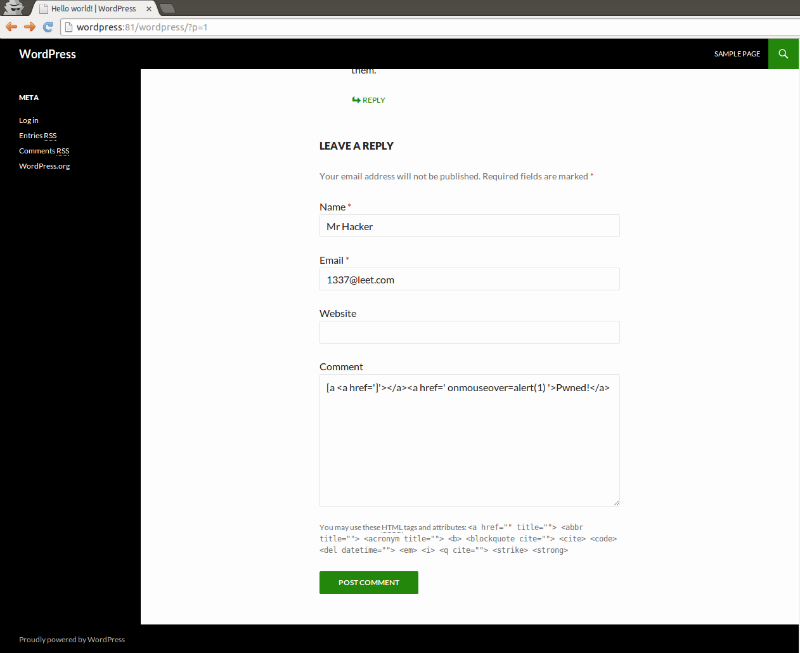
    Here’s how easy it looks like in practice. Go to the blog by WordPress and enter a bad comment:

    8758dfb3bad2ce0e7a14dd14cdd535db

    Next we see a specially crafted comment allows to bypass checks and conduct XSS-attack:

    b76d8a02ea439497f939a01fd973e02a

    After capturing admin permissions an attacker can run their code on the server that is hosting the attacked blog, that is, can develop an attack on a broad front. Now is the time to remember that just recently 800,000 credit cards were stolen by a bank trojan which was distributed across WordPress sites.

    This vulnerability applies to all versions of WordPress 3.0 and higher. Problem can be solved upgrade engine to version 4, where no such problem.

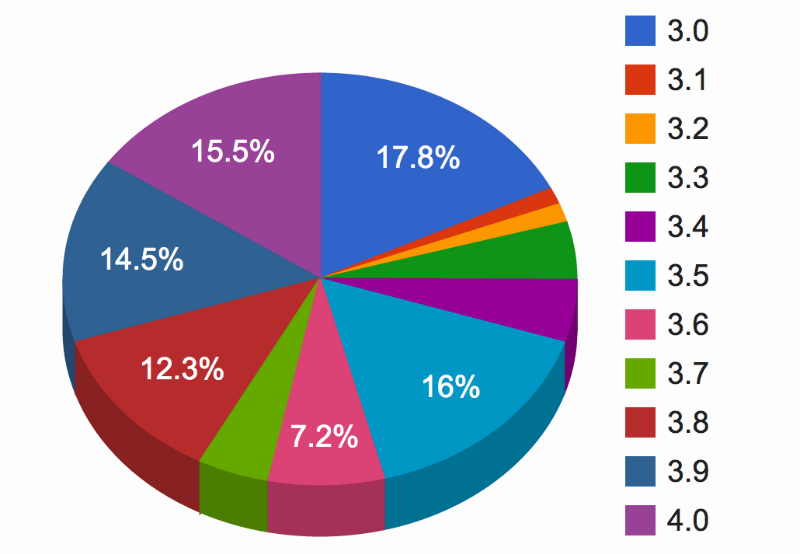
    And now about the actual reaction. Finnish security experts discovered a vulnerability reported it to the vendor on September 26. At the time of this writing, that is, two months later after finding renewed no more than 16% of users of WordPress (see diagram on the title picture post). What Finnish experts concluded that all the other 84%, that is tens of millions of users of this engine in the world, stay potential victims.

    In fact, the victims will certainly be less because there is a small additional condition for the operation – need the opportunity to comment on posts or pages (default is available without authorization). However, we are interested in here is the lifetime of vulnerability, and in this case it is possible to observe in real time – to monitor the statistics update WordPress here. Although you probably already understand the meaning of these figures: don’t lock the barn door after the horse is stolen.

    We also follow the intruders attempt to exploit this vulnerability “in the wild”. To do this, use a network attack detection based applications PT Application Firewall. The mechanism of intrusion detection based on the analysis of anomalies in this case worked well, and we did not have to add the signature. In other words, PT AF elicited this “0 day” from the very beginning:

    7cb201b9b1a2dd366483e30842c7c00f

    At the moment, the vulnerability exploitation attempts is already found. They can not be called mass – but if you have an older WordPress, should still be updated.

    This text is a translation of article “84% сайтов на WordPress могут быть взломаны: что дальше?” by ptsecurity published on habrahabr.ru.

    Forums and blogs without spam

    CleanTalk is a SaaS spam protection service for Web-sites. CleanTalk uses protection methods which are invisible for site visitors. Connecting to the service eliminates needs for CAPTCHA, questions and answers and other methods of protection, complicating the exchange of information on the site.