Stop spam without frustrating your visitors

Create your CleanTalk account and start blocking spam — no CAPTCHA challenges and no impact on visitors.

Security Block Lists

CleanTalk Account

No credit card required • Setup takes less than a minute • Your temporary password will be sent by email.

Tag: guides 2026

  • GiveWP – Spam Protection guide in 2026. Stop spam donations!

    GiveWP – Spam Protection guide in 2026. Stop spam donations!

    CleanTalk has added spam protection for GiveWP using direct form integration. This makes it a good opportunity to explore how to protect GiveWP against spam submissions using both built-in anti-spam tools integrated into the plugin core and third-party solutions. We will start with CleanTalk and then move on to Akismet, Google reCAPTCHA, Cloudflare Turnstile, honeypot techniques, and universal anti-spam plugins available on WordPress.org.

    GiveWP – Donation & Fundraising Plugin for WordPress

    In case of any misunderstanding or misinterpretation about which plugin we are referring to, allow me to provide a brief overview of GiveWP

    GiveWP is a powerful WordPress donation plugin that helps nonprofits, charities, and organizations accept online donations directly on their websites. It allows you to create fully customizable donation forms and securely collect one-time or recurring donations without relying on third-party fundraising platforms. To maintain secure fundraising, GiveWP can be combined with spam protection solutions that help prevent fake donations, bot submissions, and fraudulent registrations. The plugin supports popular payment gateways such as PayPal and Stripe, making it easy for donors to contribute using their preferred payment method. Built-in reporting, donor management tools, and fundraising goal tracking help organizations monitor performance and grow contributions. With a wide range of add-ons and integrations, GiveWP scales from small campaigns to large nonprofit organizations while following WordPress best practices for reliability and security.

    According to WordPress.org, over 100,000 websites use this plugin.

    Install GiveWP – Donation Plugin and Fundraising Platform

    Show Instructions

    To have the plugin installed follow this steps,

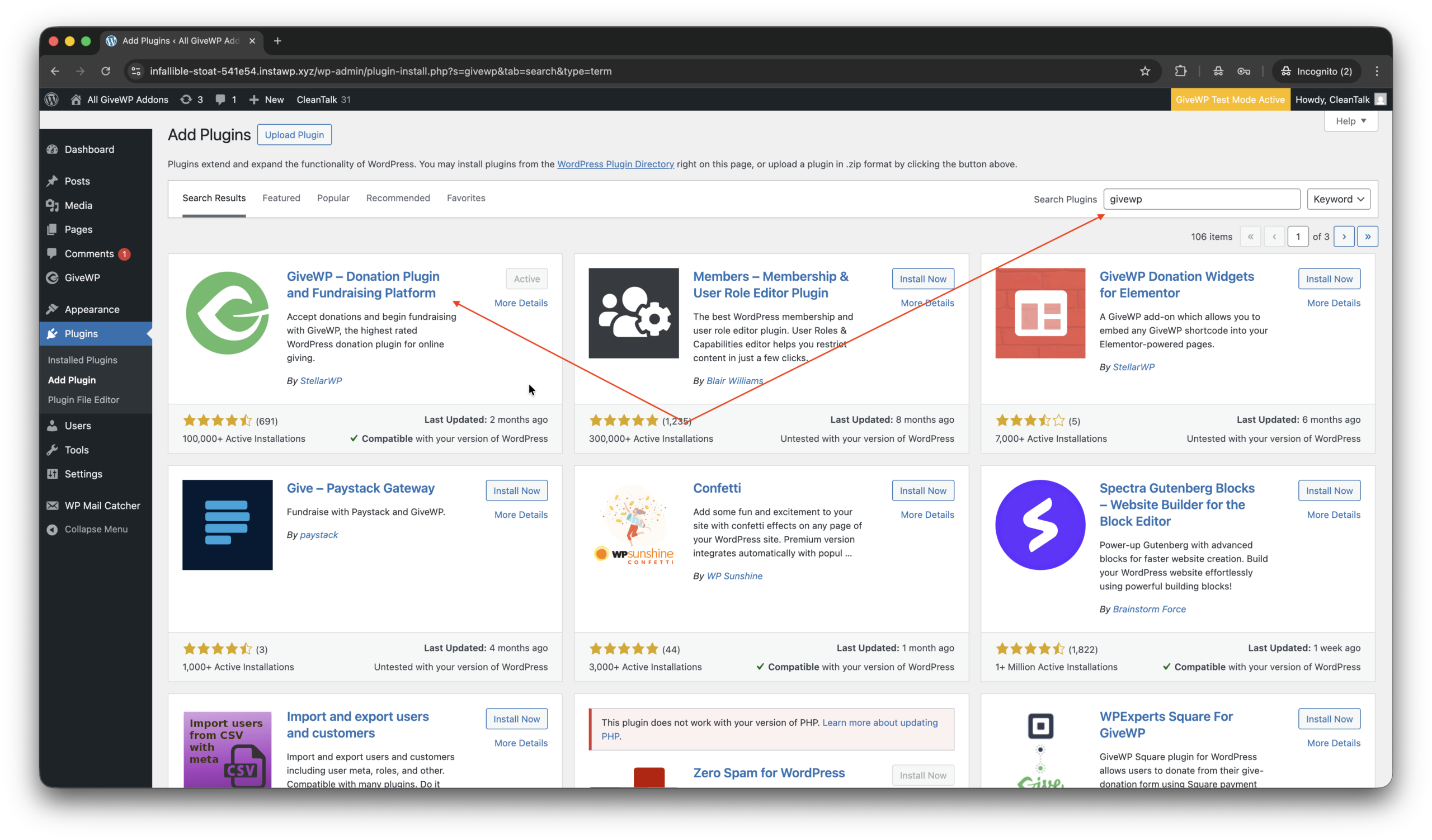
    1. Search for the plugin in WordPress console -> Plugins -> Add plugin -> Search -> givewp

    2. Install and Activate the plugin.

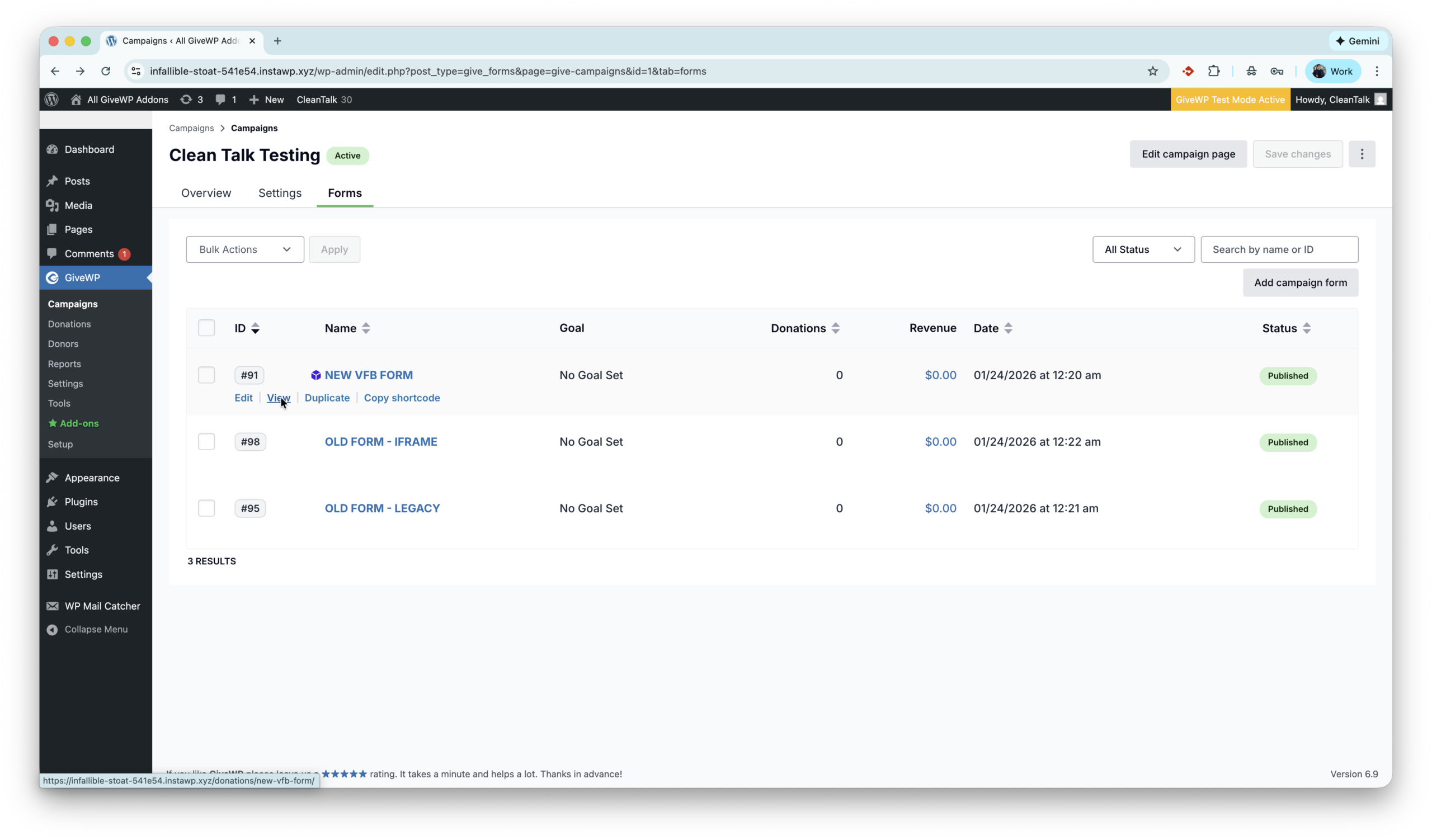
    3. Add a campaign and forms in WordPress console -> GiveWP -> Campaigns -> Forms.

    That’s all! GiveWP is installed.

    Anti-Spam plugin by CleanTalk for WordPress

    The next plugin we are going to use is the Anti-Spam plugin by CleanTalk. Here is a short description of it,

    CleanTalk Anti-Spam plugin for WordPress protects your site from spam comments, contact forms, registrations, and fake donations without CAPTCHA. It uses cloud-based spam detection and real-time databases to block bots automatically while keeping the experience smooth for real users. CleanTalk works in the background and requires minimal setup, making it a reliable hands-off anti-spam solution.

    CleanTalk has additional features like Block and Allow lists to manage specific Emails, IPs, Countries, custom frontend message to blocked donations and Emails obfuscation which might be helpful during fundraising events.

    According to WordPress.org, over 200,000 websites use this plugin. All features of Anti-Spam plugin for WordPress.

    How to install CleanTalk Anti-Spam plugin

    Show Instructions

    To install the Anti-Spam plugin, go to your WordPress admin panelPluginsAdd New.

    Then enter «СleanTalk» in the search box and click the Install button for «Spam protection, Anti-Spam, FireWall by CleanTalk».

    After installing the plugin, click the «Activate»‎ button.

    After it is done go to the plugin settings and click the «Get Access Key Automatically» button. Then just click the «Save Settings»‎ button.

    That’s it! GiveWP is completely protected, let’s see how to test the protection.

    How to check spam protection for GiveWP Forms

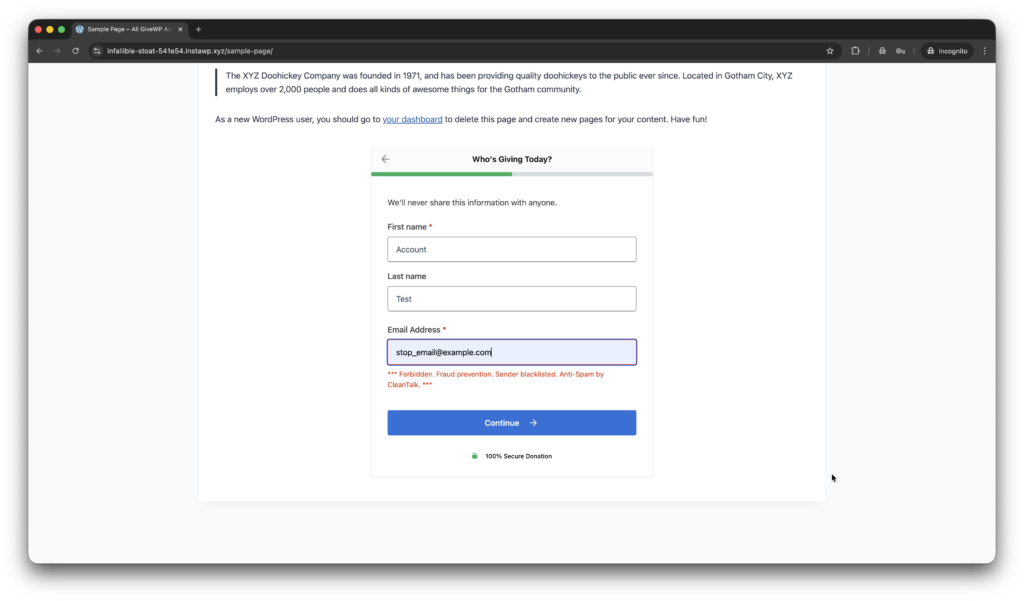
    You can test the work of Anti-Spam protection for GiveWP by using a test email,

    stop_email@example.com

    1. First, open the form in an Incognito browser tab.
    2. Choose amount to donate.
    3. In the next step fill out the account name data and the stop_email@example.com.
    4. You must see a message as below and in the screenshot.

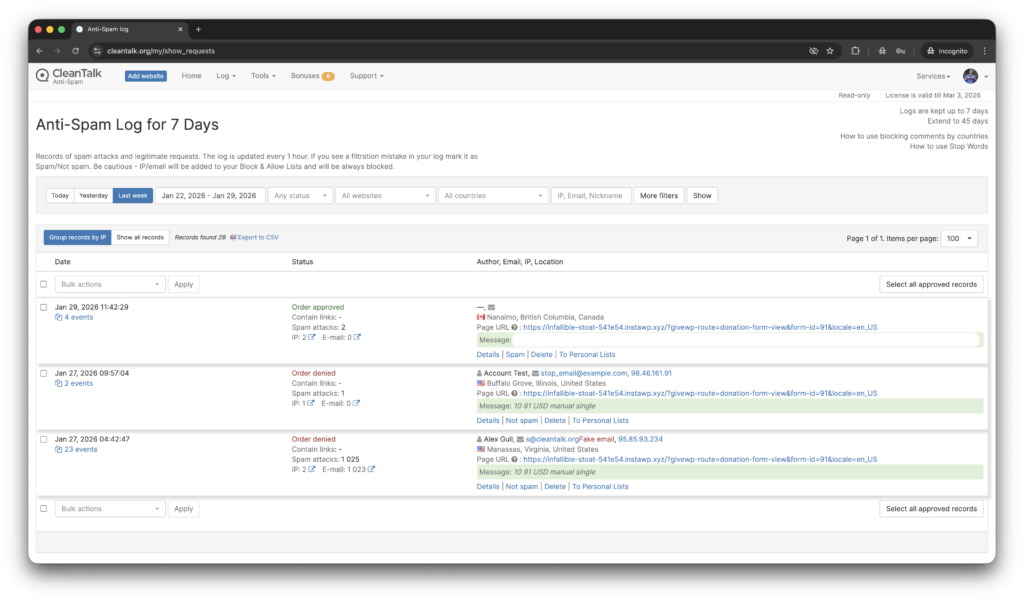
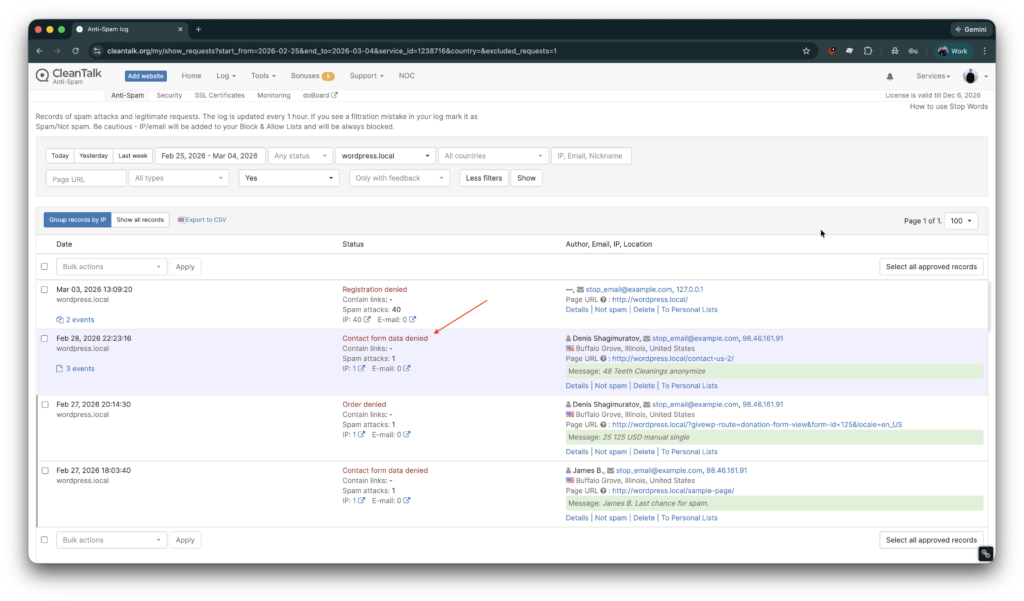
    In addition, in the Cloud Dashboard you can find extra details regarding all submissions for the donation form,

    • IP, Email of the donator. As well as history of activity a sender among other sites connected to CleanTalk’s cloud.
    • Geolocation of the sender.
    • Date and time of submission.
    • Page (URL) of the submission.
    • Cloud decision – Approved, Denied.
    • Cloud explanation for the decision.
    • Tools to move the sender to Block or Allow lists.

    What additional anti-spam tools are available for GiveWP?

    Here are a few more tools on the market,

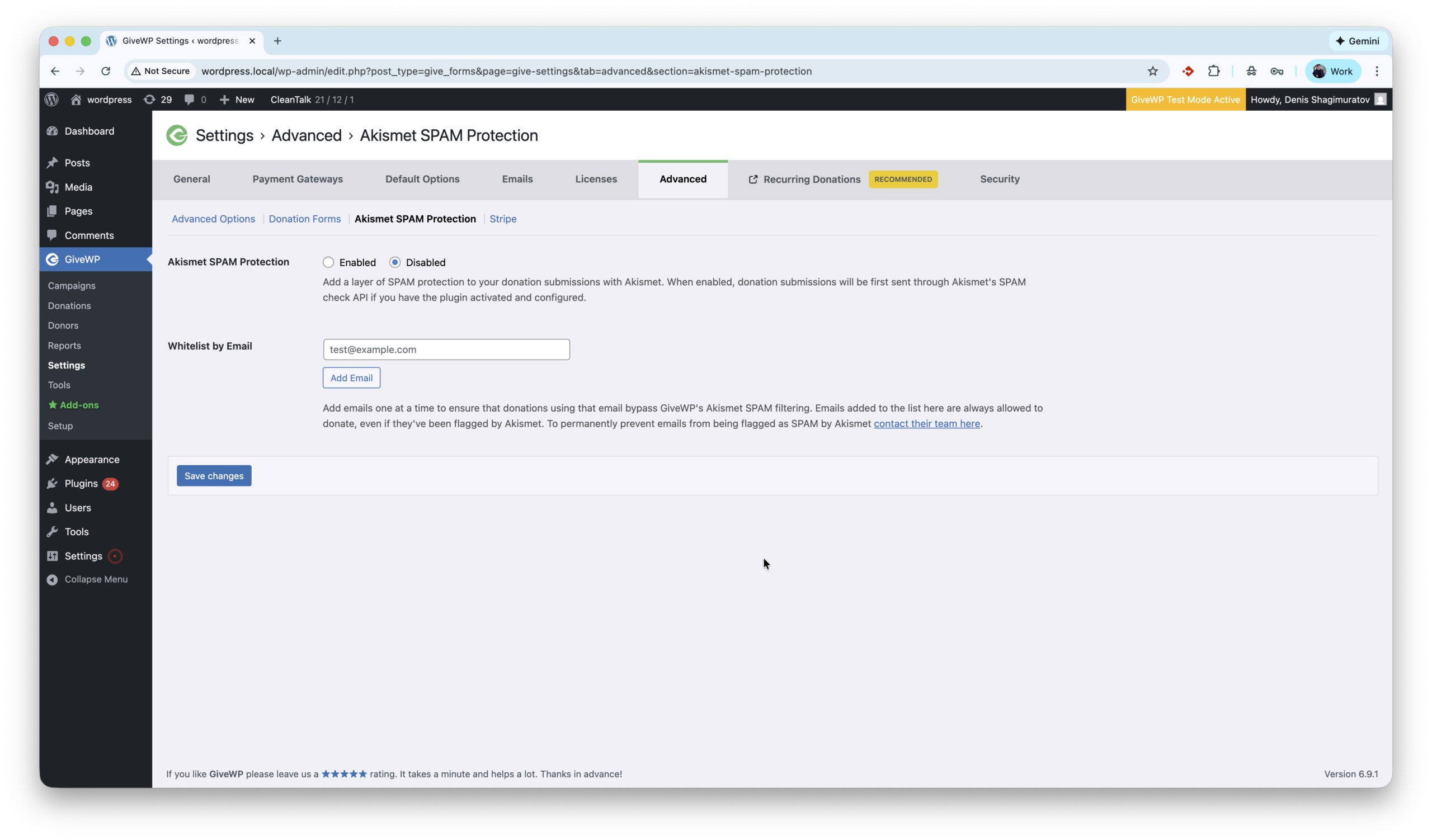
    1. Akismet is a cloud-based anti-spam service that works in the background and has excellent compatibility with WordPress. Most importantly, the GiveWP team has included Akismet integration directly in the core of the plugin, providing a seamless user experience for those who choose Akismet as their anti-spam solution. Akismet settings are located under WordPress console -> GiveWP -> Settings -> Advanced -> Akismet SPAM Protection. Here is full guide how to setup protection.
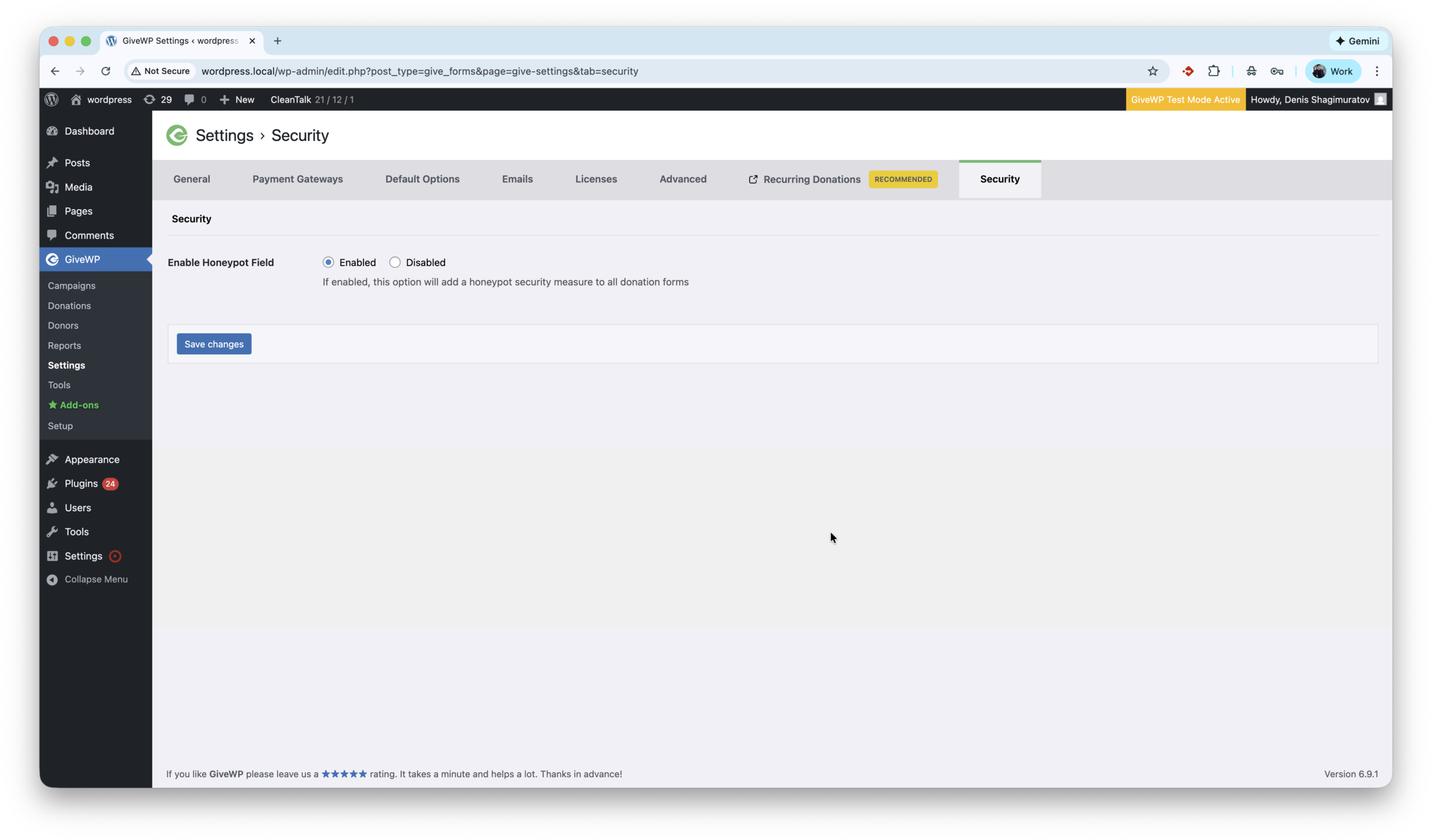
    2. Honeypot anti-spam techniques protect websites by adding invisible form fields that real users never see but spambots automatically fill in. When these hidden fields are completed, the submission is flagged and blocked, stopping spam without CAPTCHAs or user interaction. GiveWP has built-in honeypot which is located under settings WordPress console -> GiveWP -> Settings -> Security -> Enable Honeypot Field. This option is On in default setting, so should filter some primitive spam bots out of the box.
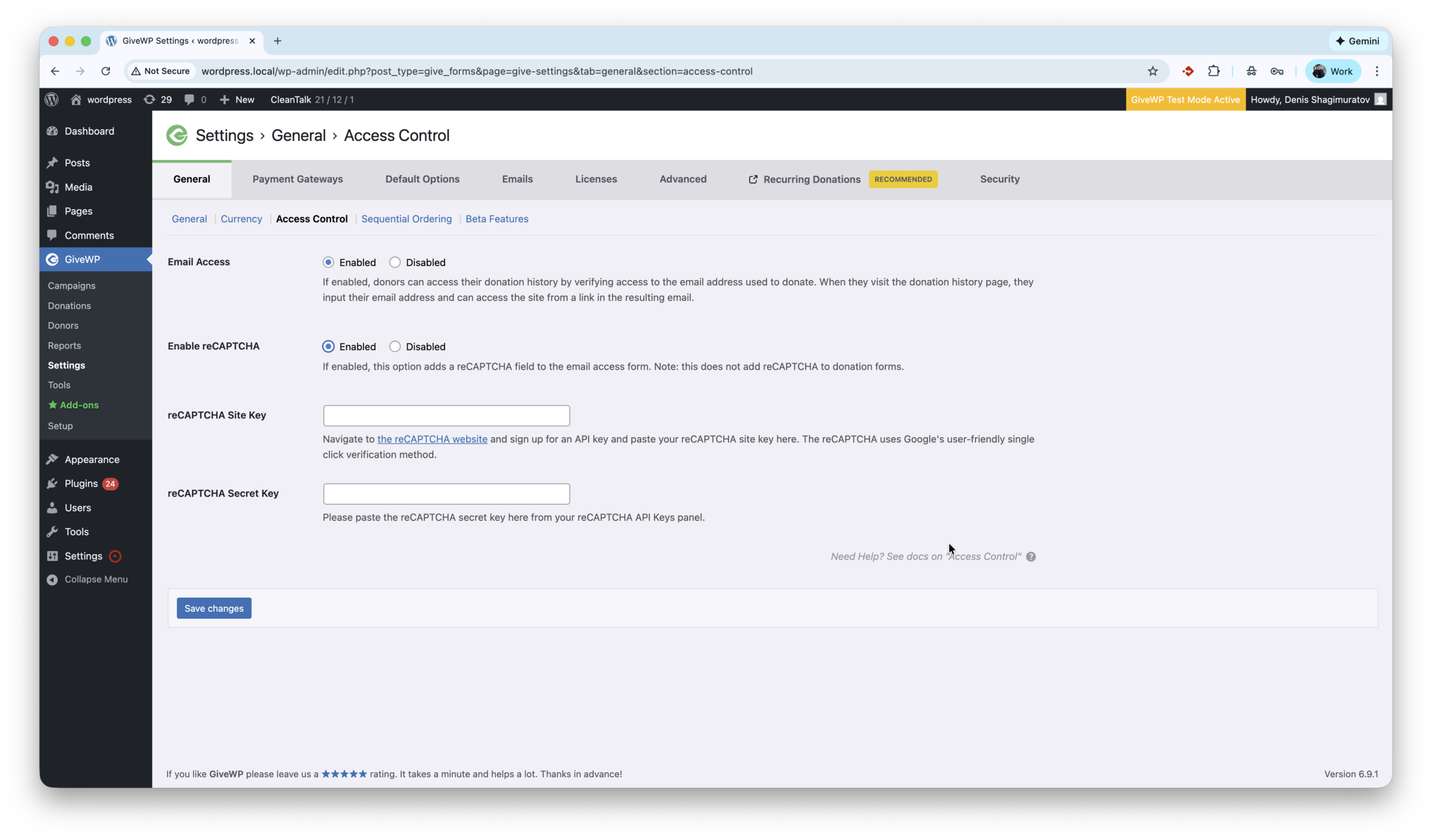
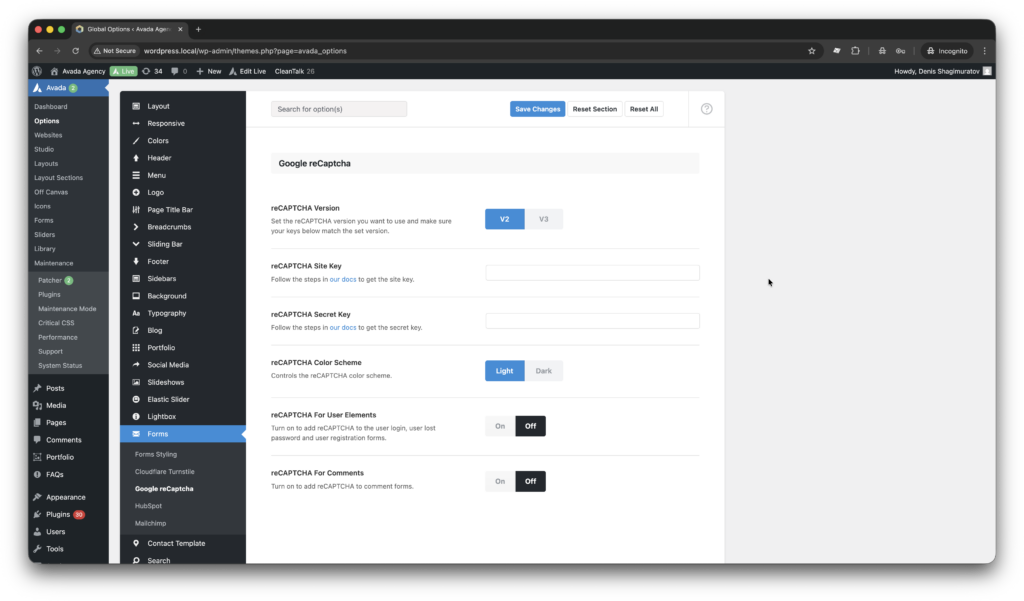
    3. reCAPTCHA is a spam protection technology by Google that helps protect WordPress websites by distinguishing real users from bots using challenges or behavioral analysis. It reduces automated spam submissions but may require user interaction, such as clicking a checkbox or solving a challenge. GiveWP supports reCaptcha in the core and settings are located by path WordPress console -> GiveWP -> Settings -> General -> Access Control -> reCaptcha. The first step to activate this protection is getting Site and Secret keys, which are available on website.
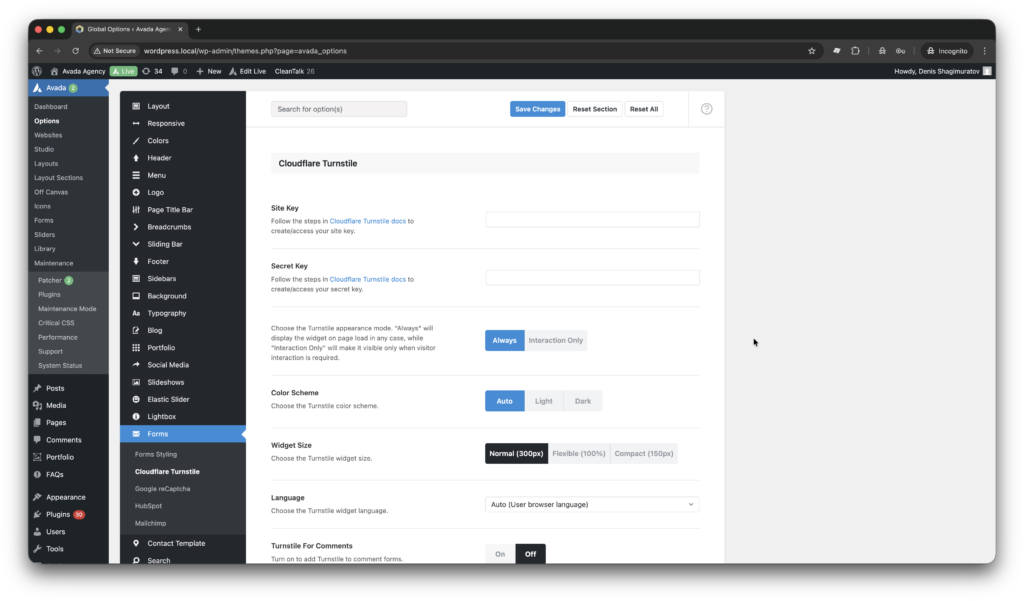
    4. Turnstile by Cloudflare is another great anti-spam tool which is available for GiveWP. Protects WordPress websites by verifying visitors automatically without CAPTCHAs or puzzles. It blocks bots using browser and behavioral signals while keeping the experience seamless for real users. One drawback is to use Turnstile user must install extra plugin – ‘Give – Cloudflare Turnstile’. The full guide is here.
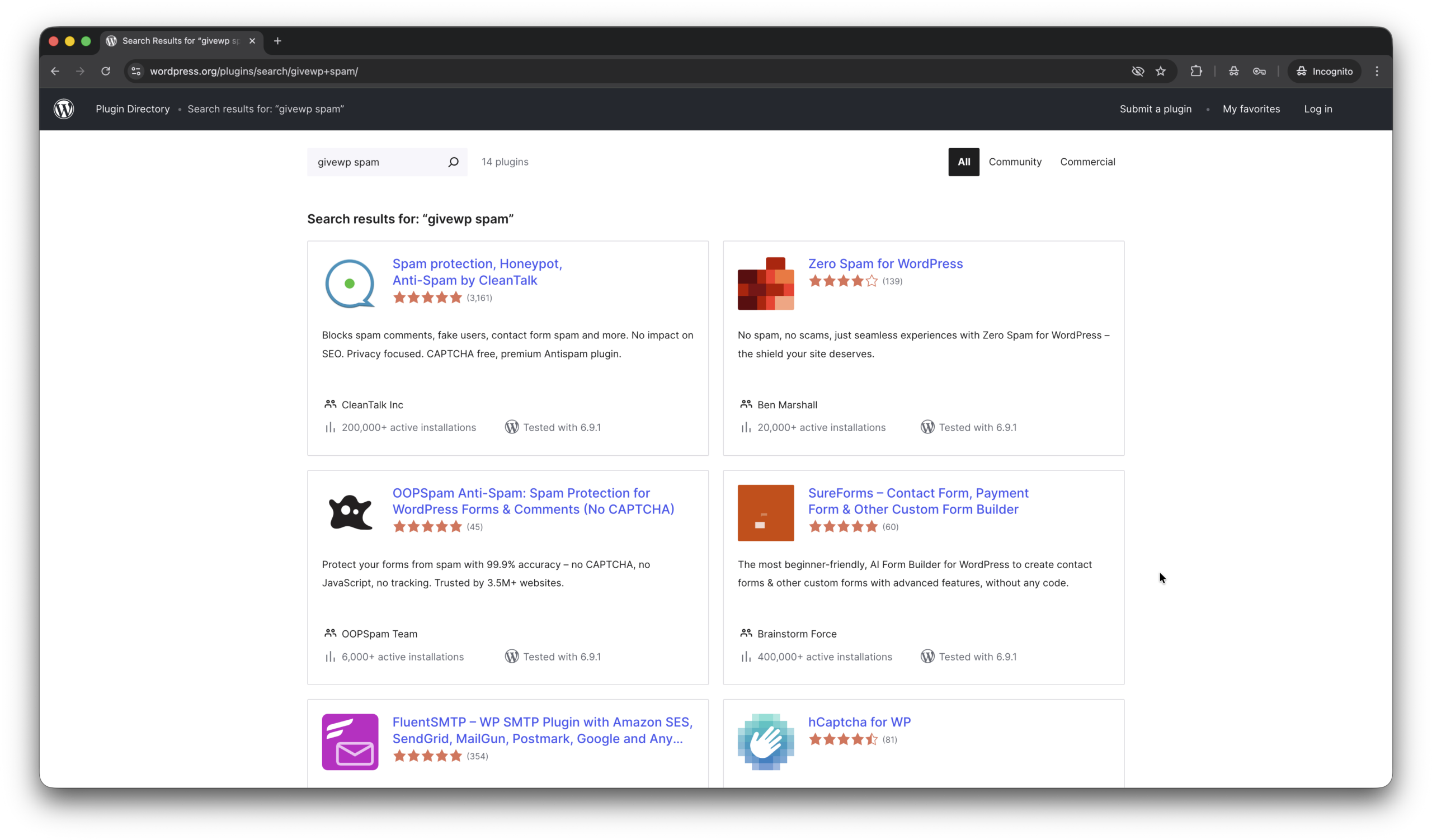
    5. And we have bunch of standalone, universal, all-in-one plugins like Zero Spam, OOPSpam, hCaptcha for WP which provide anti-spam protection for GiveWP as well. Here is a link to download one of them.

    Here are screenshots for tools above.

    I have questions… (FAQ)

    Does CleanTalk protect against donors emails leak?

    In July 2025, a vulnerability in GiveWP led to an email data leak of Pihole donators. Yes, Anti-Spam by CleanTalk helps protect against such issues. In this case, email addresses were exposed in the HTML code, even though they were invisible on public pages. The plugin prevents this by obfuscating email addresses by default.

    We received hundreds of spam donations immediately after installing GiveWP plugin. How to fix it?

    If you do not have specific anti-spam tool installed. Increasing the minimum donation amount can help stop spam, as bots usually test forms with small payments like $1–$5. Setting a $10+ minimum helps filter out these low-effort automated attacks.

    A donor is trying to submit recurring donations but the transaction isn’t being processed because the donor’s email is considered spam.

    False/positives sometimes happen. In this case just post a support ticket or put this donor in Allow list.

    Final thoughts

    I hope this guide helped resolve all spam issues on your donation form. If not, Sign Up for an account and our CleanTalk team will be happy to help.

    Stop spam without frustrating your visitors

    Create your CleanTalk account and start blocking spam donations — no CAPTCHA challenges and no impact on visitors.

    CleanTalk Account

    No credit card required • Setup takes less than a minute • Your temporary password will be sent by email.

  • Forminator Forms – Spam Protection Guide in 2026

    Forminator Forms – Spam Protection Guide in 2026

    If you use Forminator Forms, you may occasionally experience spam submissions. In the guide below, you’ll learn about several tools that help achieve complete spam protection for Forminator. In this post we will look at as built-in (in the plugin core) anti-spam tools like Honeypot, Google reCAPTCHA, hCaptcha, Cloudflare Turnstile. As well as, spam protection via third party plugins like Akismet, CleanTalk and OOPSpam.

    Forminator Forms – Contact Form, Payment Form & Custom Form Builder

    First of all, let’s figure out what Forminator Forms are.

    Forminator Forms is a powerful and user-friendly form builder plugin for WordPress that allows you to create contact forms, registrations, payment forms, quizzes, and polls without coding. Developed by WPMU DEV, the plugin has gained popularity for its flexibility and reliable spam protection designed to reduce spam submissions across websites. Since its release in 2018, Forminator has continued to evolve, introducing new integrations, improving usability, and strengthening tools that help website owners fight spam more effectively. The plugin supports payment providers such as Stripe and PayPal, enabling secure transactions while maintaining strong spam protection for payment and contact forms. Regular updates keep the plugin compatible with modern WordPress versions and current security standards, helping prevent spam attacks and automated bot activity.

    As WordPress.org shows, Forminator is currently used on over 600,000 websites and has 2,034 user reviews with an average rating of 4.8.

    Plugin Homepage at wordpress.org | Website wpmudev.com

    Install Forminator Forms, Surveys, Quizzes, Polls, Calculations and More…

    Installation is as easy as following these steps.

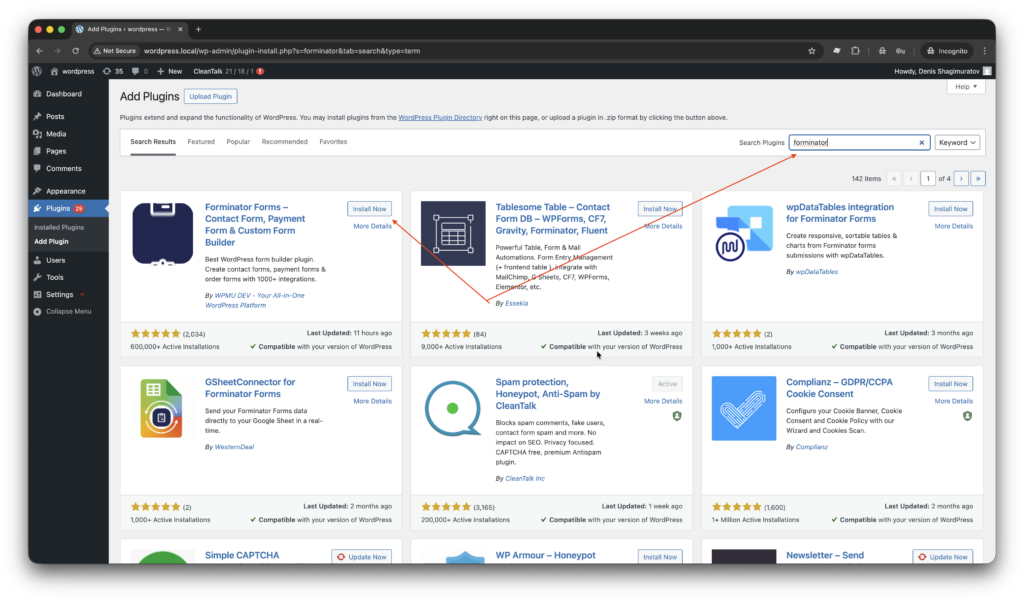
    1. Search for the plugin in WordPress console -> Plugins -> Add plugin -> Search -> Type ‘forminator

    2. Install and Activate the plugin.

    3. Add the very first contact form in WordPress console -> Forminator > Forms -> +ADD NEW -> Customer service -> Contact form.
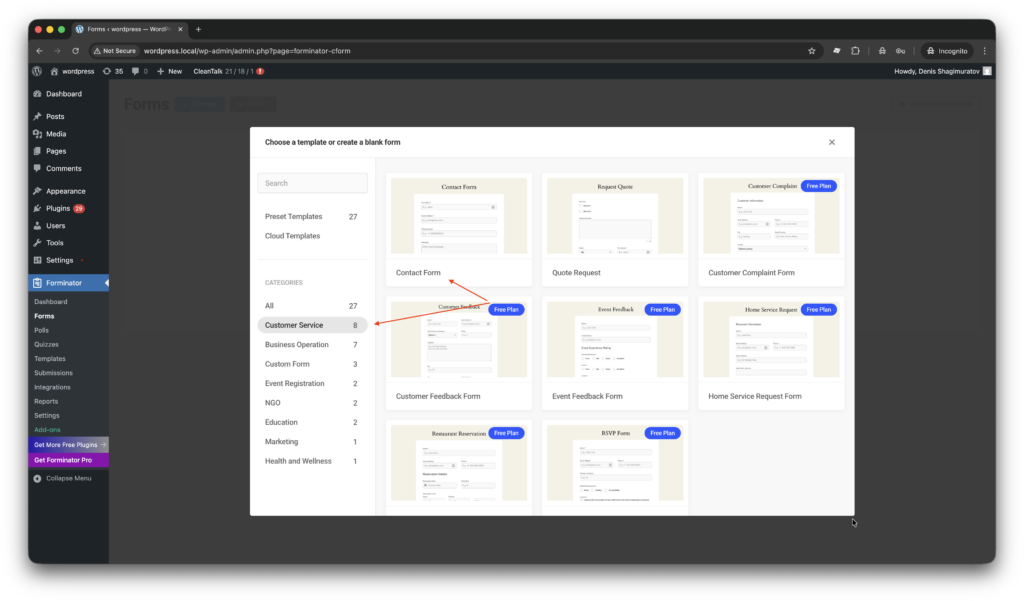
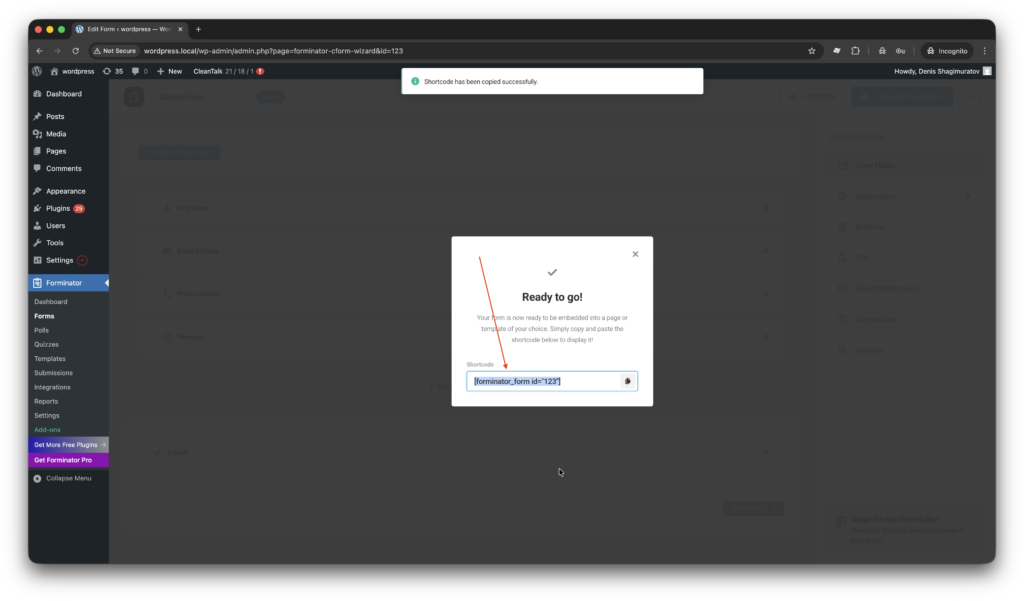
    4. Click Publish in top-left corner.

    5. That’s all! Your form is ready to go, just use a short code like this on any page or post of your site.

    [forminator_form id="123"]
    Anti-Spam plugin by CleanTalk for WordPress

    The next plugin we are going to use is the Anti-Spam plugin by CleanTalk. Here is a short description of it,

    • CleanTalk is a cloud-based spam protection for websites, founded in 2012.
    • It automatically blocks spam without CAPTCHAs or disrupting user experience.
    • Protects multiple form types: contact forms, payment forms, registrations, comments, and surveys.
    • Stops both automated bots and manual spam submissions.
    • Uses advanced filtering algorithms and a global spam detection network.
    • Detects spam activity based on IP addresses, email addresses, and behavioral patterns.
    • Users can apply custom filtering rules.
    • Allows filtering or blocking by IP, email, and country.
    • Works automatically in the background with easy installation.


    According to WordPress.org, Anti-Spam by CleanTalk for WordPress has over 200,000 active installations, with 3,165 reviews and an average rating of 4.8.

    Plugin Homepage at cleantalk.org | Latest release at Github.com | Website cleantalk.org

    Install the CleanTalk Anti-Spam plugin

    Show Instructions

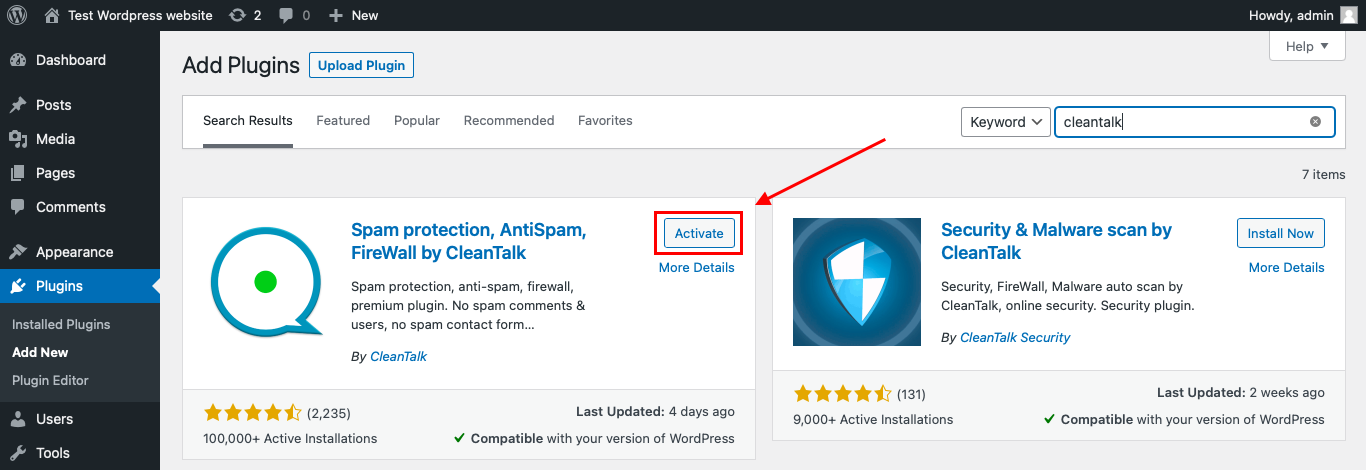
    To install the Anti-Spam plugin, go to your WordPress admin panelPluginsAdd New.

    Then enter «СleanTalk» in the search box and click the Install button for «Spam protection, Anti-Spam, FireWall by CleanTalk».

    After installing the plugin, click the «Activate»‎ button.

    After it is done go to the plugin settings and click the «Get Access Key Automatically» button. Then just click the «Save Settings»‎ button.

    That’s it! From now you know how to completely protect your Forminator Forms from spam.

    Check if spam protection works with Forminator Forms

    The best way to text the spam protection by using a test email,

    stop_email@example.com

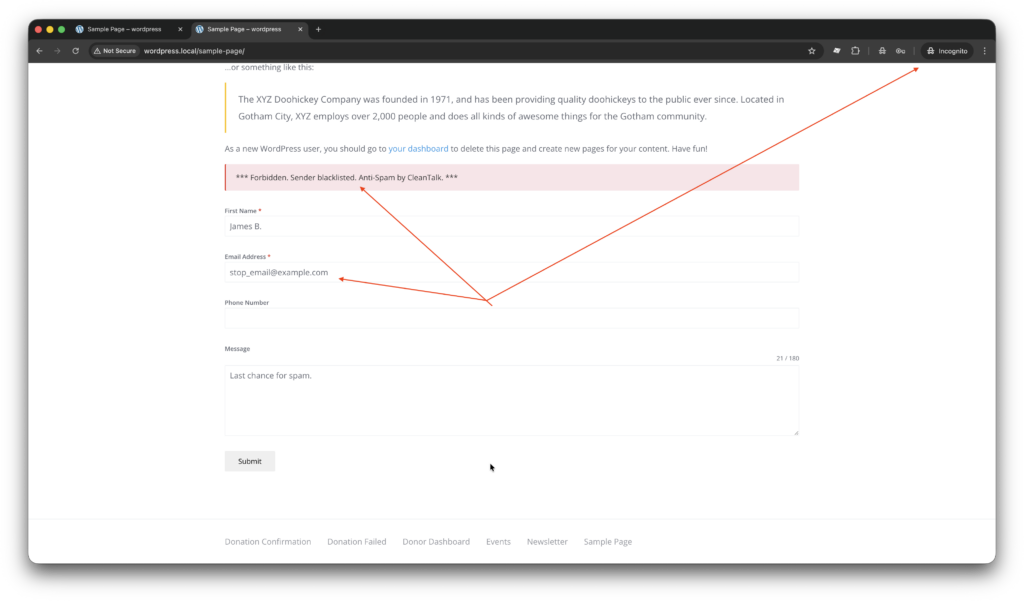
    1. Open page with your form (don’t forget to add the shortcode in the page content) in Incognito browser tab.
    2. Fill out the Contact form using stop_email@example.com as sender’s email.
    3. Send the form.
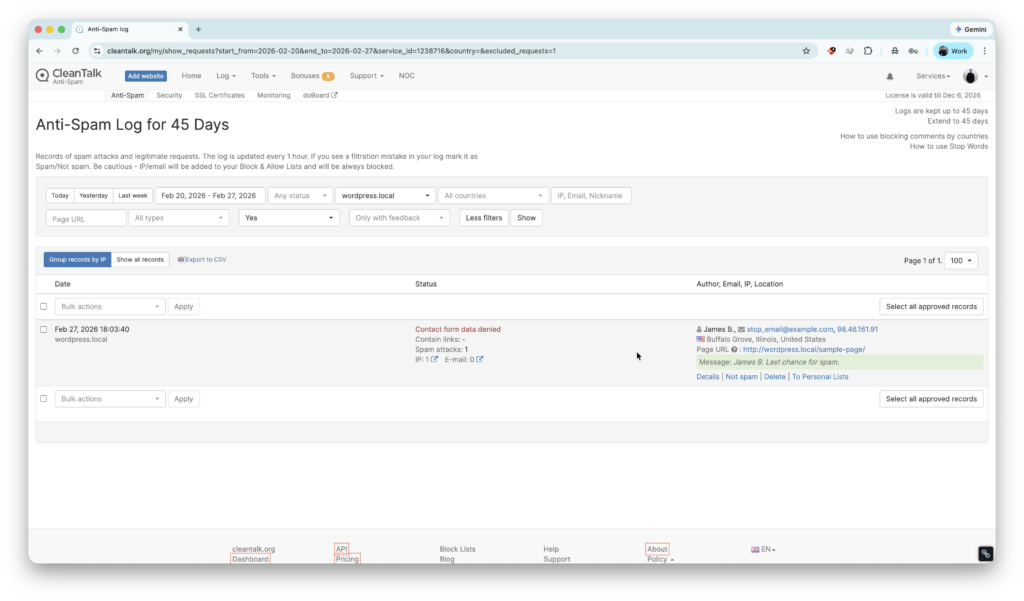
    4. You should see a message from the Anti-Spam plugin confirming that a spam submission was blocked.

    Cloud Dashboard

    In addition, in the Cloud Dashboard you can find extra details regarding all submissions made via form,

    • IP, Email of the donator. As well as history of activity a sender among other sites connected to CleanTalk’s cloud.
    • Geolocation of the sender.
    • Date and time of submission.
    • Page (URL) of the submission.
    • Cloud decision – Approved, Denied.
    • Cloud explanation for the decision.
    • Tools to move the sender to Block or Allow lists.
    Google reCAPTCHA, hCaptcha, and Cloudflare Turnstile

    Also, let’s have a look at cloud, anti-spam services that we have for Forminator forms,

    1. The plugin has core integration with many CAPTCHA services,
      • Forminator integrates with Google reCAPTCHA, helping users reduce spam submissions while adding an extra layer of security to contact forms, registrations, and surveys. This allows website owners to protect their forms automatically without complex configuration. To activate this service obtain Site key and Secret key on the site.
      • hCaptcha support. Forminator users can reduce spam submissions while maintaining better privacy for visitors and improving overall form security.
        • Key benefits of hCaptcha over reCAPTCHA,
          • Better privacy for visitors. hCaptcha collects less user tracking data compared to Google reCAPTCHA, which is important for privacy-focused websites and GDPR-sensitive regions.
          • Reduced dependence on Google services. Using hCaptcha allows Forminator users to avoid relying on Google infrastructure, which some organizations prefer for compliance or branding reasons.
          • Potential monetization option. hCaptcha offers a program where site owners can earn small rewards for solving challenges, something reCAPTCHA does not provide.
        • hCaptcha requires Site Key and Secret key as well, which can be obtained on site.
      • Cloudflare Turnstile. By integrating with Cloudflare Turnstile, Forminator users can protect their forms from spam and bots without showing traditional CAPTCHA challenges. Turnstile works invisibly in the background, helping improve user experience while maintaining strong spam protection for contact forms, registrations, payments, and surveys. This reduces friction for real visitors, increases form completion rates, and keeps submissions clean without interrupting the workflow.
        • Main benefits of Cloudflare Turnstile over Google reCAPTCHA,
          • Invisible verification. Turnstile works mostly in the background without puzzles or image challenges, so visitors can submit Forminator forms faster and with less frustration compared to reCAPTCHA.
          • Higher form conversion rates. Because users are not interrupted by CAPTCHA challenges, contact forms, surveys, and payment forms typically see fewer abandoned submissions.
          • Strong privacy approach. Turnstile is designed to minimize user tracking and does not rely on extensive behavioral profiling, which makes it more privacy-friendly than reCAPTCHA.
        • Site Key and Secret key can be obtained on site.
      • All CAPTCHA services are aviable under settings Settings are under path WordPress console -> Forminator > Forms -> Settings -> CAPTCHA -> reCAPTCHA | hCaptcha | Turnstile.

    Honeypot, Akismet and third-party Anti-Spam Plugins

    Additionally, let’s consider standalone plugins and anti-spam mechanics that also works for Forminator forms,

    1. Honeypot. Which is most simple anti-spam mechanic against primitive spam bots. It works by adding hidden fields that are only detected and filled by bots, allowing spam to be blocked automatically while legitimate users never see additional challenges. Because no CAPTCHA or interaction is required, honeypots help maintain a smooth user experience and improve form completion rates. This lightweight method is easy to enable and adds an extra layer of protection for contact forms, surveys, and registrations.
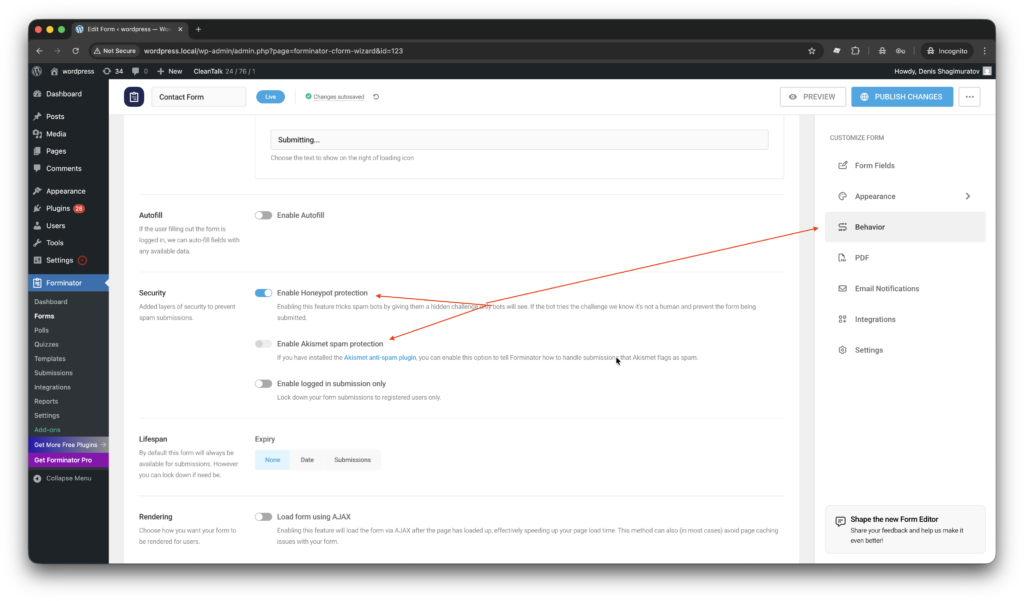
      • Settings are available per each individual form, the path is WordPress console -> Forminator > Forms -> FORM -> Settings -> Behavior -> Security. Please look at screenshots down below.
    2. Third-party Anti-Spam plugins.
      • Akismet. Akismet helps Forminator users automatically filter spam submissions by analyzing form data against its global spam detection network. It works in the background to identify suspicious content and prevent unwanted messages from reaching your inbox or database. This reduces manual moderation and helps keep contact forms, surveys, and registrations clean. As a widely used WordPress anti-spam solution, Akismet is easy to enable and integrates naturally into existing WordPress workflows.
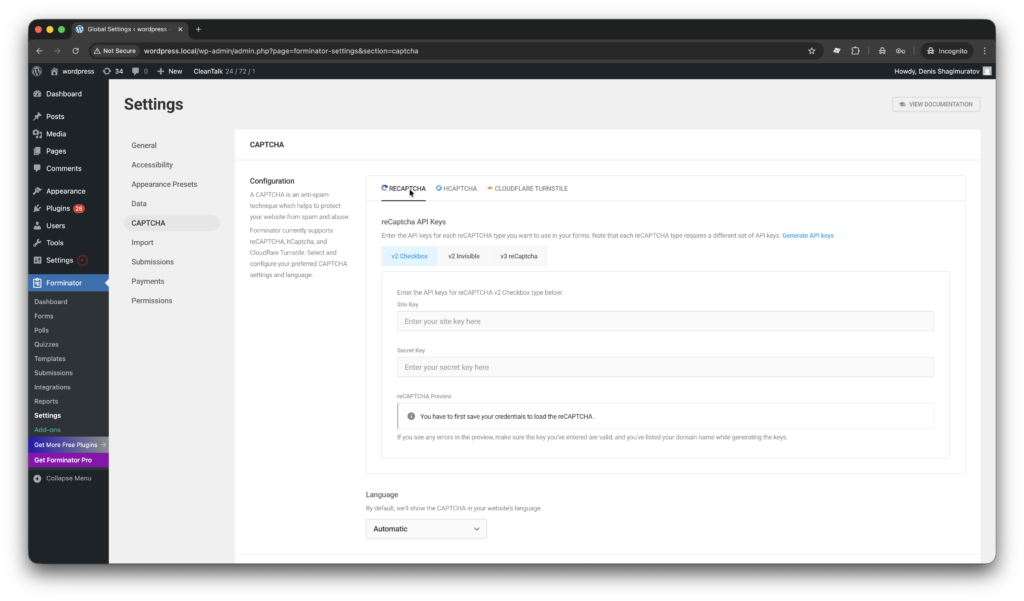
        • In order to activate protection user must install, activate and get API key for third-party plugin Akismet and then turn integration under the settings WordPress console -> Forminator > Forms -> FORM -> Settings -> Behavior -> Security. Please look at screenshots down below.
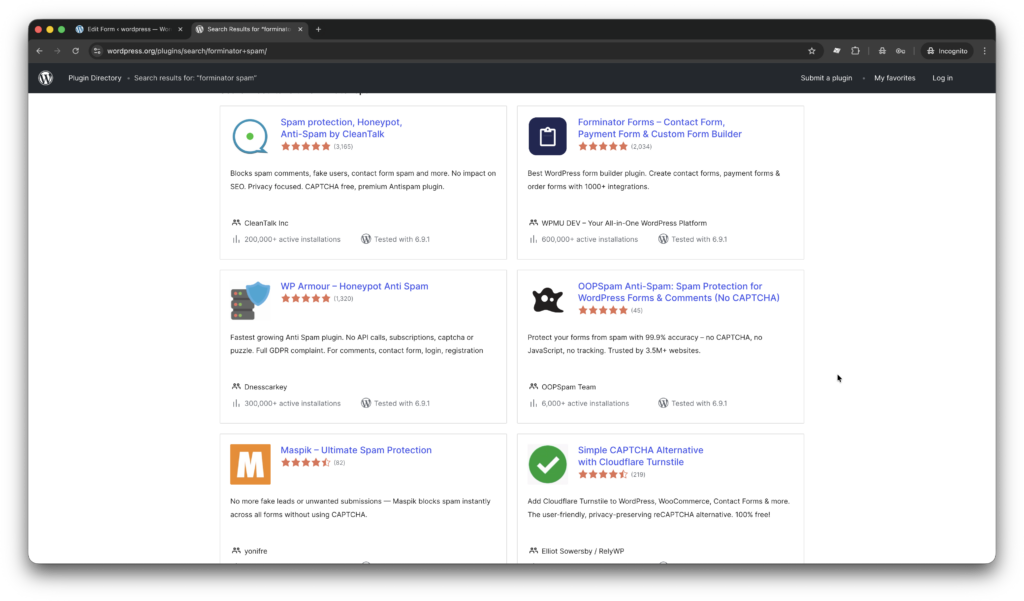
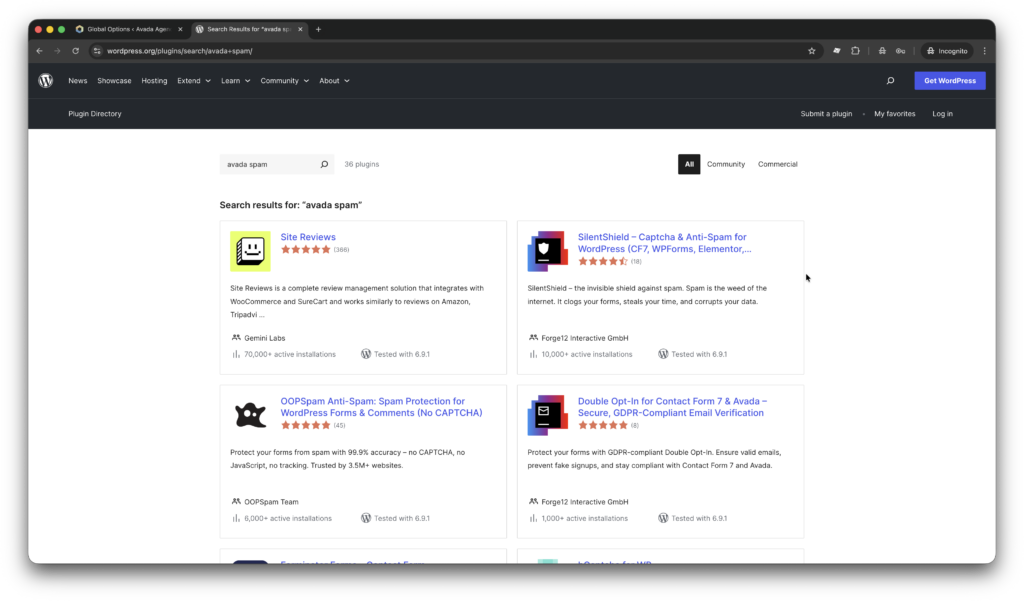
      • WP Armour, OOPSpam, Maspik, and Simple CAPTCHA Alternative are universal anti-spam plugins for WordPress that provide reliable spam protection for Forminator users. All of these solutions can be found in the search results at wordress.org.

    Here is a guide by WPMU DEV. It tells how to protect Forminator with additional cloud services such as Honeypot (not as service), Google reCAPTCHA, hCaptcha, Cloudflare Turnstile. Third party plugins like Akismet, and OOPSpam.

    Frequently Asked Questions (FAQ)

    Cannot stop spam from coming through forms no matter what…

    If nothing works in this guide, try a few more things,

    1. Block spammers by particular IPs, Countries via Personal lists under your CleanTalk’s account.
    2. Submit a support request, we will do our best to tune spam protection for your specific case.
    v3 reCAPTCHA not saving in Forminator Settings. V2 shows ‘ERROR for site owner: Invalid key type’

    Forminator’s team doesn’t have a solution for this error, but advices to switching to hCaptcha, read more.

    Forminator x hCaptcha does not prevent spam

    The main recommendation is to avoid relying on hCaptcha alone, enable Forminator’s honeypot protection, prevent plugin conflicts, and use layered anti-spam methods for better results. WordPress.org.

    Emails from website contact form going to spam.

    The recommended solution is to check SMTP configuration using a real email account so the website sends messages through authenticated mail servers instead of the default PHP mail system. Installing and configuring an SMTP plugin ensures proper email delivery and improves sender reputation, preventing form notifications from being marked as spam. WordPress.org.

    Recommended Anti-Spam Stack for Forminator (2026)

    Finally, no single anti-spam tool can stop every type of spam submission. The most reliable approach for Forminator users is a layered protection stack, where each tool blocks a different category of bots and spam behavior.

    Recommended setup by site type

    • Business website: CleanTalk + Honeypot.
    • High-traffic landing pages: CleanTalk + Turnstile.
    • Membership / registration sites: CleanTalk + Turnstile or hCaptcha.

    By now, all spam issues in your Forminator contact, survey, poll, or quiz forms should be resolved. If not, Sign Up for an account and our support team will be happy to help you.
    Stop spam without frustrating your visitors

    Create your CleanTalk account and start blocking spam forms, surveys, polls and quiz answers — no CAPTCHA challenges and no impact on visitors.

    CleanTalk Account

    No credit card required • Setup takes less than a minute • Your temporary password will be sent by email.

  • Avada Form – Spam protection in 2026

    Avada Form – Spam protection in 2026

    Avada Form Builder is a great choice when you need to create contact forms, surveys, quizzes, and more. In this post, we will review available anti-spam services such as Google reCAPTCHA and Cloudflare Turnstile, tools like honeypots, and anti-spam plugins including CleanTalk, Akismet, WP Armour, and OOPSpam available to Avada users as of March 2026.

    Avada Form Builder, Avada Website Builder, Avada WordPress Theme and Plugins

    First, let’s take a closer look at what Avada is and how it works.

    Avada Form Builder is a flexible drag-and-drop form solution built directly into the Avada WordPress theme, allowing users to create contact forms, registration forms, surveys, polls, quizzes, feedback forms, and other interactive form types without installing additional plugins. It offers an intuitive visual interface that makes form creation fast and accessible for both beginners and experienced website owners. To help protect websites from unwanted submissions, Avada Form Builder supports built-in spam protection features and integration with popular anti-spam services such as Google reCAPTCHA, Cloudflare Turnstile. With proper spam protection enabled, website owners can reduce bot submissions, fake registrations, and malicious form activity while maintaining a smooth experience for real visitors. This improves data quality, saves administrative time, and keeps communication channels reliable.

    In my personal opinion, Avada is a very flexible theme that offers many features out of the box. However, one downside is that it may require some time to build and launch the first version of a website using this theme. I spent more than hour to launch a demo site (including purchasing the theme), it’s much more my average installation process for a theme, which usually takes 10-15 minutes.

    The theme is premium and costs $69, with 6 months of support included. Its official website is avada.com, and it can be purchased and downloaded from Envato Market. Envato Market shows 1,054,005 sales, 26.5k reviews with average score 4.78.

    How to install CleanTalk Anti-Spam plugin

    To install the Anti-Spam plugin, go to your WordPress admin panelPluginsAdd New.

    Then enter «СleanTalk» in the search box and click the Install button for «Spam protection, Anti-Spam, FireWall by CleanTalk».

    After installing the plugin, click the «Activate»‎ button.

    After it is done go to the plugin settings and click the «Get Access Key Automatically» button. Then just click the «Save Settings»‎ button.

    That’s it! From now your WordPress website and Avada forms are protected from spam.

    You can always use our detailed installation instructions.

    How to check your Avada forms spam protection in about 5 minutes

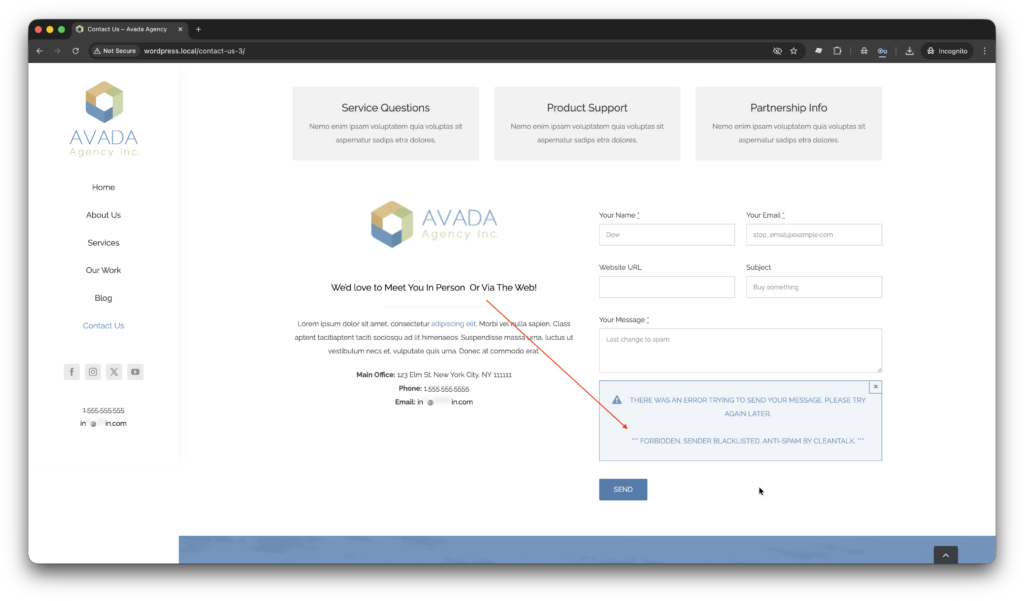
    You can test the work of Anti-Spam protection for your Avada forms by using a test email s @ cleantalk.org (without spaces). First, open the form in an Incognito browser tab. Fill in all the required form fields and send a form. After submitting the form, you will see a block message about the block on the form submission.

    If you have any questions, add a comment and we will be happy to help you.
    Create your Cleantalk account – Register now and enjoy your spam-free Avada forms.

    You may view a complete list of CleanTalk Anti-Spam plugin features here. https://cleantalk.org/help/introduction 

    WordPress spam protection